For local shop owners, solo service providers, and small team leaders, web-based projects often sit on the to-do list because they feel expensive, confusing, or easy to get wrong. The core tension is real: customers expect a smooth online experience, but digital transformation challenges can pile up fast when time, budget, and technical confidence are limited. Half-finished sites, scattered apps, and inconsistent processes can quietly slow online business growth even when the business itself is strong. With the right mindset and a clear plan, entrepreneurial tech adoption becomes a practical way to build visibility, trust, and momentum.
Use 6 Core Tools to Upgrade Your Web Presence
Small web upgrades can turn “we should fix our site someday” into real growth, more leads, smoother sales, and fewer admin headaches. Use the six tools below as a simple checklist, then prioritize them based on the projects that will pay you back fastest.
1. Make your website effortless to use (especially on mobile): Start with your top three customer tasks (find services, see pricing, contact/buy) and make each doable in 2–3
taps from the homepage. Use clear menu labels, one primary call-to-action per page, and short forms that only ask for what you truly need. Don’t guess, run quick usability testing with 3–5 real customers and ask them to complete one task while thinking out loud.
2. Fix the “speed bumps” that cost you conversions: Check your site on a phone using cellular data and time how long it takes to become usable; if it feels slow, it is. Compress large images, remove unnecessary plugins/widgets, and keep your homepage focused so it loads quickly. Strong website speed and performance helps visitors stick around long enough to contact you or buy.
3. Lock down trust basics with simple security features: Turn on HTTPS, require strong passwords, and enable multi-factor authentication for your website logins and email accounts. Add automated backups (daily if you update often), keep your platform and plugins updated weekly, and limit admin access to only people who truly need it. Put a small trust signal where it matters, like secure checkout messaging on payment pages and a short privacy note near forms.
4. Cover SEO fundamentals with a repeatable page template: Pick one primary keyword theme per page (service + location is a great start) and use it naturally in the page title, main heading, and first paragraph. Add a clear FAQ section that answers 4–6 real customer questions, then write meta descriptions that explain the benefit and who it’s for. Set up a basic local listing, and ask happy customers for a few keyword-rich reviews that mention the service you provided.
5. Set up an online storefront that matches how you actually sell: Start simple: offer 5–10 best-selling items/services, include shipping/pickup options, and write product pages that answer “what is it, who is it for, what does it include, how long does it take?” Use clear photos, transparent return/refund rules, and an abandoned-cart email to recover sales. If you sell services, treat the “storefront” as online booking plus deposits and automated confirmations.
6. Automate follow-ups and connect invoicing/accounting to cash flow: Create 2–3 automations first, new lead follow-up, appointment reminders, and post-purchase check-ins, so nothing slips through when you’re busy. Many teams adopt this approach since 60% of companies use automation tools in their workflows, often to reduce manual work. Then connect your invoicing/accounting software to send invoices the same day, accept online payments, and automatically categorize common expenses so you can see profit by month and budget your next web project with fewer surprises.
Build Business Skills That Make Digital Decisions Easier
Once you’ve started upgrading your web presence with the right tools, the next advantage is strengthening the business judgment behind every digital choice. One practical (and often overlooked) path is building your business acumen through an online degree. Going back to school can sharpen the leadership, financial management, and strategic planning skills that help you budget with more confidence, weigh tradeoffs, and choose tools that actually fit your goals.
Depending on what you want to strengthen most, a degree in accounting, business, communications, or management can build skills that support a healthier, more resilient operation. If you want a structured route you can pursue while still running day-to-day operations, an online business bachelor degree is designed for flexibility so you can learn while you work.
And as you keep investing in your business, whether that’s new software, a new website, or going back to school, you’ll be better prepared to follow a clear workflow for setting up and optimizing web projects step by step.
Plan → Build → Launch → Improve
With that stronger decision-making foundation, a simple workflow helps you turn digital tools into steady progress. This rhythm keeps your website, e-commerce, and marketing moving forward without turning into a one-time project.
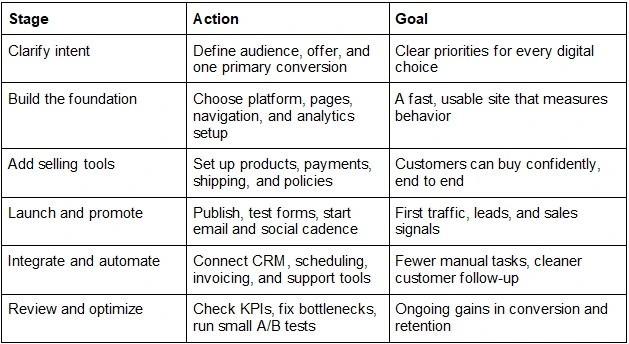
Stage Action Goal
Clarify intent Define audience, offer, and one primary conversion Clear priorities for every digital choice
Build the foundation Choose platform, pages, navigation, and analytics setup A fast, usable site that measures behavior
Add selling tools Set up products, payments, shipping, and policies Customers can buy confidently, end to end
Launch and promote Publish, test forms, start email and social cadence First traffic, leads, and sales signals
Integrate and automate Connect CRM, scheduling, invoicing, and support tools Fewer manual tasks, cleaner customer follow-up
Review and optimize Check KPIs, fix bottlenecks, run small A/B tests Ongoing gains in conversion and retention
Each stage feeds the next: clarity prevents wasted builds, a solid base supports selling, and promotion reveals what to improve. When you integrate tools and review performance regularly, optimization becomes routine instead of reactive.
Digital Tools for Small Businesses: Common Questions
Q: What SEO basics actually move the needle for a small business? A: Start with one primary service or product per page, a clear page title, and helpful headings
that match what customers search. Create or update your Google Business Profile, then ask for reviews consistently. Pick a simple routine: improve one page per week and track clicks and calls.
Q: How can I improve website security without hiring a full-time IT person? A: Use strong, unique passwords, turn on two-factor authentication, and keep your site platform, themes, and plugins updated. Install an SSL certificate, run automatic backups, and limit admin access to only who needs it. A monthly 15-minute security checklist is often enough to prevent common issues.
Q: Can automation really help, or is it only for bigger companies? A: Automation is a small business advantage because it removes repetitive tasks like follow-ups, appointment reminders, and invoice nudges. The 29% of small business owners automating business processes often do it specifically to avoid burnout, not to “be fancy.” Start with one workflow that saves you 30 minutes a week.
Q: What should I automate first so I do not break anything? A: Begin with low-risk steps: email confirmations, lead capture to a CRM, and calendar scheduling. Keep a manual backup for the first two weeks and review every message that goes out. Once it is stable, add payments, shipping updates, or support ticket routing.
Q: Should I buy lots of tools to grow faster? A: Fewer tools usually wins, because overlap creates confusion and extra costs. Choose one tool per job: one analytics setup, one email platform, and one place to store customer info. If a tool does not save time, increase sales, or reduce errors within 30 days, consider removing it.
Keep Small Business Growth Moving With Three Digital Priorities
Digital tools can feel like a moving target, too many options, not enough time, and a fear of choosing wrong. The steady path is simple: treat digital strategy implementation as an ongoing, measured practice focused on building online presence with practical web project tips you can repeat and improve. When this approach becomes routine, small business online growth looks less like a sprint and more like dependable progress you can track. Start small, stay consistent, and let results guide the next step.
https://www.phoenix.edu/online-business-degrees/business-bachelors-degree.html